 Prod
ProdMigrate from Custom Product Tabs (YIKES) without losing your tabs
I queried the wordpress.org API today about Custom Product Tabs for WooCommerce, the product tabs plugin by YIKES: its last update was on April 12, 2025.
It still runs on more than 80,000 shops, and I just wrote a tool to move away from it.
That tool lives in ProdTabs, the competing plugin I build, so keep that in mind when you get to the end.
Here are my notes on how YIKES stores its data, which should be useful whatever tool you are moving to.
What wordpress.org says
The request:
curl -s 'https://api.wordpress.org/plugins/info/1.2/?action=plugin_information&request%5Bslug%5D=yikes-inc-easy-custom-woocommerce-product-tabs'The response weighs 34 KB, and here are the four fields I care about:
"version": "1.8.6",
"last_updated": "2025-04-12 5:21pm GMT",
"tested": "6.7.10",
"active_installs": 80000
WordPress itself is at version 7.1.3, according to the same API on the same day.
That does not mean YIKES is broken: it means its maker has not declared it tested on anything newer than WordPress 6.7.
Where YIKES stores its tabs
Everything lives in a single product field, yikes_woo_products_tabs, which WP-CLI shows like this on my demo shop:
$ wp post meta get 16 yikes_woo_products_tabs --format=json
[{"title":"Livraison","id":"livraison","content":"Livraison en 48 h en France métropolitaine, offerte dès 49 €. [...]"},{"title":"Garantie","id":"garantie","content":"Garantie de 2 ans, pièces et main d'oeuvre."}]
It is an array with one item per tab and three keys (title, id and content), and the order of the array is the display order.
Saved tabs, the ones you reuse across products, live in a site option that I read with wp option pluck:
$ wp option pluck yikes_woo_reusable_products_tabs 4 --format=json
{"tab_title":"Garantie","tab_name":"","tab_content":"<p>Garantie de 2 ans, pièces et main d\\'oeuvre.<\/p>","tab_id":4,"taxonomies":[],"tab_slug":"garantie","global_tab":false}
The taxonomies and global_tab keys are for the Pro version, which shows a tab on a whole category or on every product.
A third option links saved tabs to the products that use them:
$ wp option pluck yikes_woo_reusable_products_tabs_applied 16 --format=json
{"1":{"post_id":16,"reusable_tab_id":"1","tab_id":"livraison"},"4":{"post_id":16,"reusable_tab_id":"4","tab_id":"garantie"}}
The detail that matters for a migration: a saved tab is not a reference, it is a copy pasted into each product.
When you edit it, YIKES rewrites every copy, product by product (file admin/class.yikes-woo-saved-tabs.php in version 1.8.6, from line 208).
The id comes from the title
Here is line 168 of admin/class.yikes-woo-tabs.php, which builds a tab's id on every save, using sanitize_title():
$tab_id = urldecode( sanitize_title( $tab_title ) );That id is both the anchor (#tab-livraison) and a CSS class, which has two consequences:
- Two tabs with the same title on one product get the same id, and YIKES then only shows one of them.
- Renaming a tab changes its anchor, so links you already sent out, in a newsletter for example, stop opening the right tab.
An id set once at creation and never recomputed would have avoided both, and that is the choice I made in ProdTabs.
Deleting YIKES wipes everything
The uninstall.php file of YIKES has not changed in seven years, and it opens with this comment:
// When the plugin is uninstalled, brush away all footprints; there shall be no trace.Promise kept.
The following lines delete the yikes_woo_products_tabs field from every product, then the two saved tab options.
Deactivating the plugin touches nothing, but deleting it from the Plugins screen runs this file and empties the database of all its tabs.
If I were you, I would keep it deactivated for a few weeks after the migration, without deleting it.
Before you switch
Here is what I would check on a real shop before touching anything:
- A database backup exists, or better, a full copy of the site is there to try things on.
- The theme does not customize YIKES:
grep -rn yikes wp-content/themes/finds filters such asyikes_woocommerce_custom_repeatable_product_tabs_heading, and themu-pluginsfolder deserves the same look. - You know which content links to a tab, which
wp db search '#tab-' wp_postslists in one command. - The shortcodes used in tabs come from plugins that are still active, otherwise they will show up as raw text after the switch.
On my demo shop both commands return nothing, which will probably not be the case on yours.
The import I wrote for ProdTabs
I wrote the import in the free version of ProdTabs with one rule: at no point should the shop show a product without its tabs, or with its tabs twice.
So YIKES stays active during the import, and each imported product only shows its ProdTabs tabs while the others stay as they are.
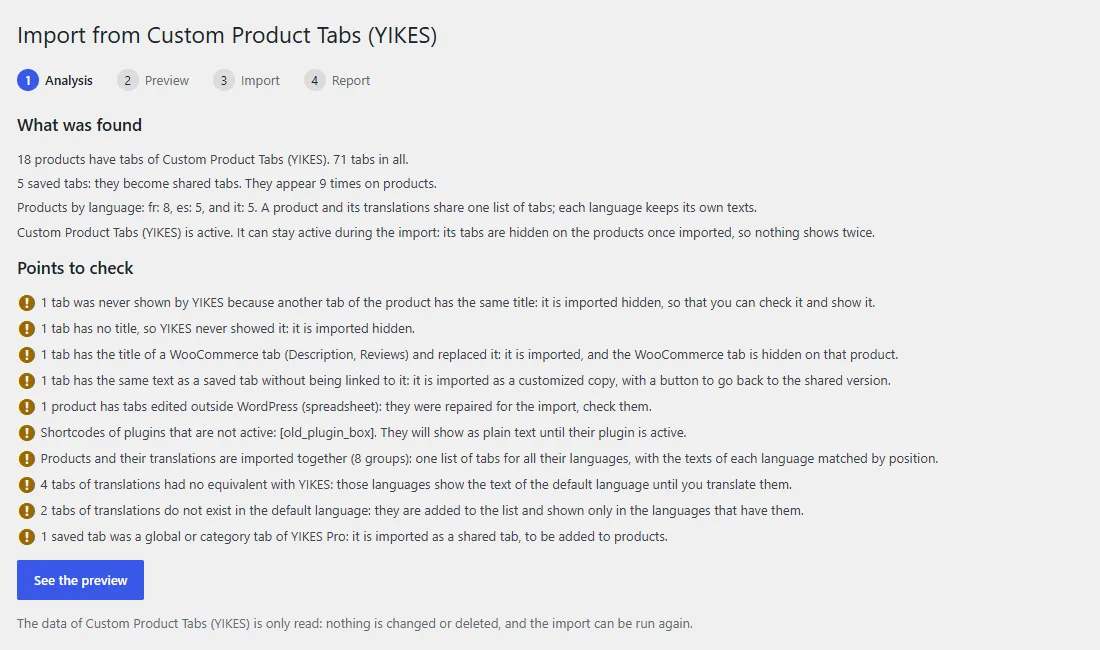
It all starts with an analysis that reads the data without writing anything, and here is what it finds on my three-language demo shop:
Then comes a preview, product by product, of the list of tabs as it will be after the import:
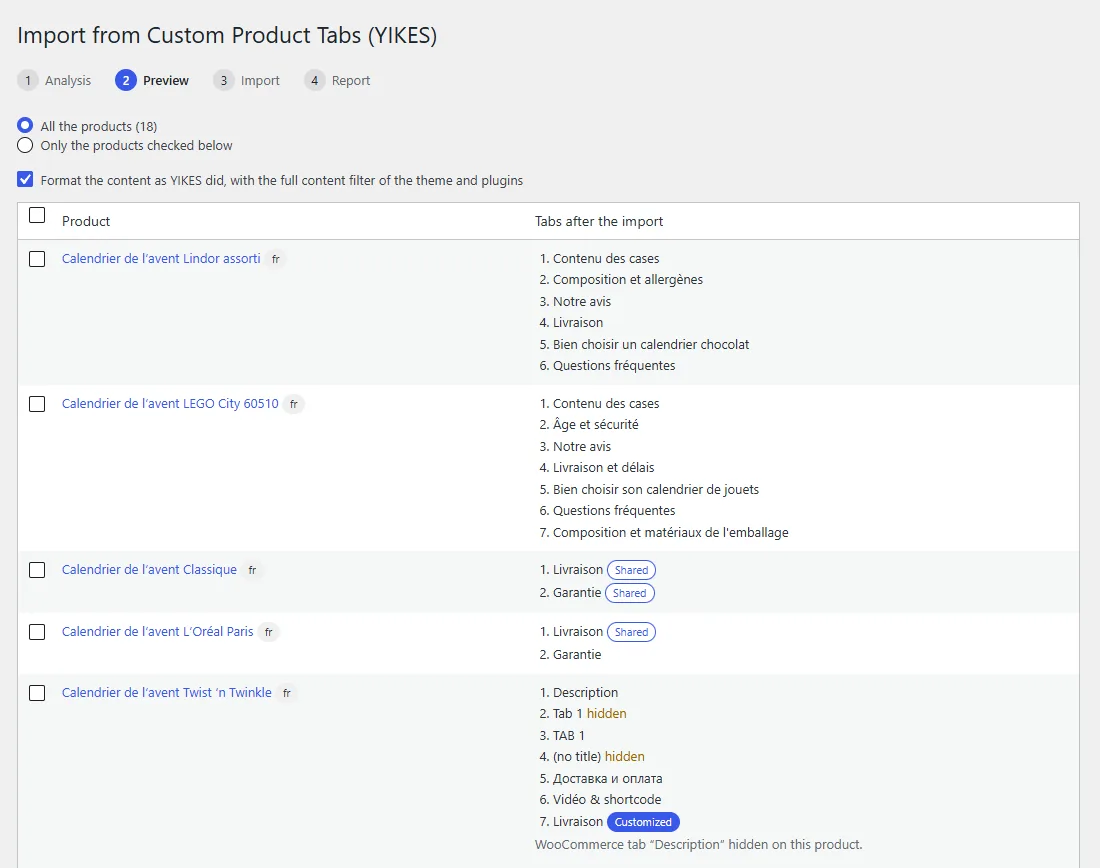
(Yes, one product has a tab called "Tab 1" and another called "TAB 1": I filled this demo shop with every twisted case I could think of.)
The ticked box at the top runs the texts through the the_content filter, as YIKES did, so the rendering does not change.
The import then runs in batches and picks up where it stopped if the page closes, until it reaches this final report:
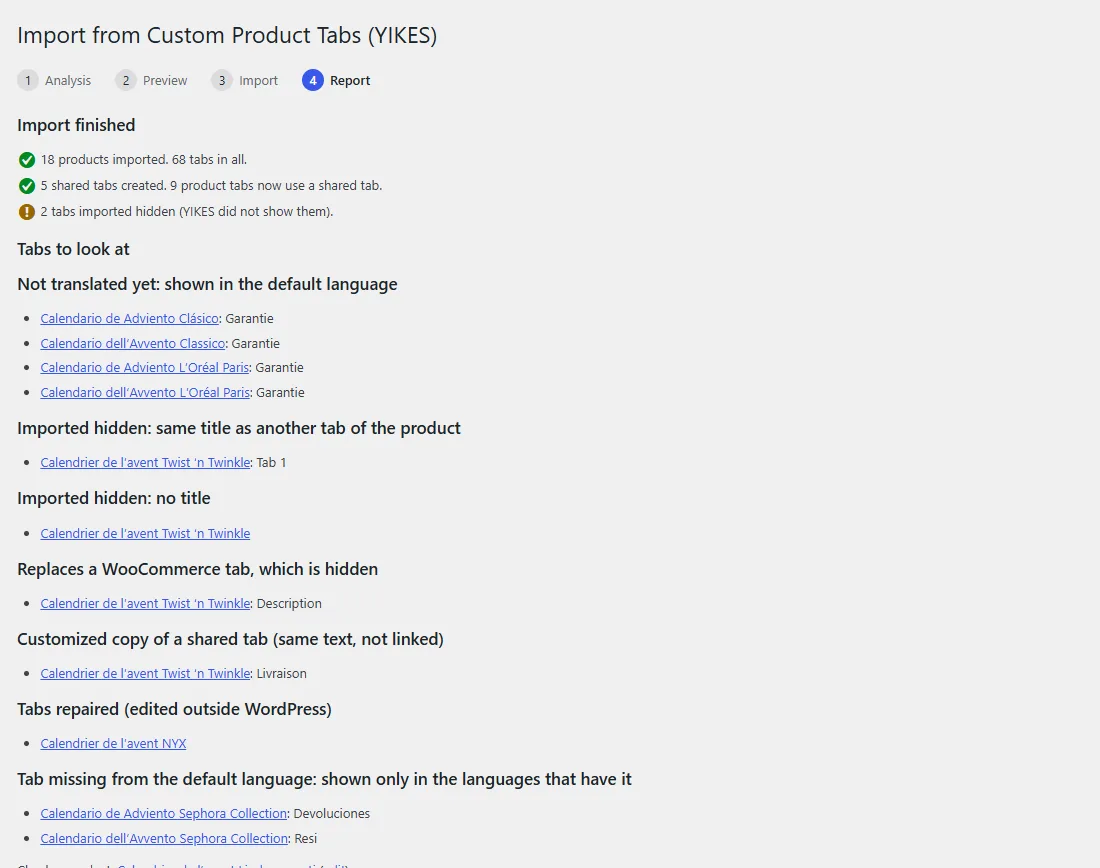
On a multilingual shop, a product and its translations are imported together, and saved tabs written once per language become a single shared tab with its translations.
For what comes next, I wrote a guide on translating tabs with WPML and Polylang.
From the command line
On a big shop I would use WP-CLI, whose dry-run mode writes nothing and prints the plan, product by product:
$ wp prodtabs import-yikes --dry-run
id   lang  group  status    tabs                                                      notes
[...]
16   fr    16     ok        shared:Livraison #livraison | shared:Garantie #garantie
18   fr    18     ok        -description | Description #description-2 | [hidden] Tab 1 #tab-1-2 | TAB 1 #tab-1 | [...]   duplicate, untitled, replaces_native, looks_saved
20   fr    20     repaired  Cuidado #entretien | Origine #origine
[...]
70   es    17     ok        shared:Livraison #livraison | (default language text) garantie #garantie   missing_translation
[...]
18 products, 5 saved tabs.
On my 18 products the command took 1.7 seconds.
The YIKES ids are kept as they are: a link to #tab-livraison still opens the same tab.
The --products=14,15 option limits the import to a few products for a first try, the command with no option imports everything, and --undo rolls back.
Rolling back
The "Undo the import" button in the report does the same as --undo: products get back what they had before, and the shared tabs the import created go to the trash.
With YIKES active, its tabs come back, provided its data is still there, hence the point of not deleting it too early.
I have not yet seen this import run on a big production shop, only on my test shops.
The ProdTabs zip is here, and if the import trips over a case I did not plan for, write to me: that is exactly what I am looking for.