 Prod
ProdTranslate WooCommerce product tabs with WPML or Polylang
I saved the Spanish translation of a product on my test shop today, running Polylang 3.8.10 and Custom Product Tabs for WooCommerce 1.8.6.
The result: the French and Italian tabs were replaced by the Spanish one.
Polylang did exactly what it was told, and the problem comes from a setting meeting a tab plugin that does not describe its data.
I build ProdTabs, a multilingual tab plugin, so keep that in mind when you read the last part.
The demonstration
The product has two YIKES tabs in French (Livraison and Garantie), a single one in Spanish and a single one in Italian.
I turned on custom field synchronization (Languages > Settings > Synchronization), translated the Spanish tab, then saved the Spanish product, and here is the output of my test script:
Before:
  fr (16): Livraison, Garantie
  es (69): Envío
  it (109): Spedizione

Custom fields synchronization off (PLL()->options: [])
I translate the Spanish tab, then save the Spanish product (wp_update_post).
  fr (16): Livraison, Garantie
  es (69): Envío
  it (109): Spedizione

Custom fields synchronization on (PLL()->options: ["post_meta"])
I translate the Spanish tab, then save the Spanish product (wp_update_post).
  fr (16): Envío
  es (69): Envío
  it (109): Envío

Restored: yes, 108 identical rows | sync: []
Three languages, one tab, in Spanish.
The first pass, with synchronization off, is the control: it changes nothing in the other languages, and the last line confirms the script puts everything back.
(The whole thing ran as a script through WP-CLI, from the setting to the save with wp_update_post(): I did not redo it with a mouse in the editor.)
The explanation is in Polylang's code: on every save, it copies every field marked for synchronization over to the translations.
Once the box is ticked, every public field is part of that list, and the YIKES field, yikes_woo_products_tabs, is public.
A plugin can ask for a different rule for its own fields, which YIKES does not do.
The file that decides: wpml-config.xml
A plugin tells WPML what to do with each of its fields in a wpml-config.xml file: copy it to every language, translate it, or ignore it.
Polylang reads the same file, which makes it the one place to get right for both tools.
So I searched the YIKES folder for anything about WPML or Polylang:
$ grep -ril "wpml\|polylang" wp-content/plugins/yikes-inc-easy-custom-woocommerce-product-tabs/
wp-content/plugins/yikes-inc-easy-custom-woocommerce-product-tabs/readme.txt
A single hit, the readme, where line 24 says:
This plugin is compatible with WPML.
There is no wpml-config.xml and not a single line of code aimed at WPML.
I have not tested YIKES with WPML, and if you translate each product by hand it may well work fine.
But nothing tells WPML what this field holds, and that matters, according to WPML's documentation on fields that hold an array:
WPML translates all sub-keys in custom fields by default.
A YIKES field set to "Translate" would therefore also expose the id key to translators, the one that serves as the tab's anchor.
The fix, still according to that page, is to list in a custom-fields-texts section only the sub-keys to translate.
Update, October 16: the first version of this guide claimed that WPML did not offer texts stored in an array for translation without a configuration, which this quote contradicts.
WooCommerce's three tabs
Those do not depend on any plugin, and here is where their text comes from and where it gets translated:
| Tab | Where the text comes from | Where to translate it |
|---|---|---|
| Description | The product's main content | With the product's translation |
| Additional information | Weight, dimensions, visible attributes | Attribute values are terms, translated like categories |
| Reviews | Your customers | Nowhere, those are their words |
| Tab titles | WooCommerce's translation files | Dashboard > Updates, Translations section |
The classic trap is a title renamed by a snippet copied too fast, like this one:
add_filter( 'woocommerce_product_tabs', function ( $tabs ) {
	$tabs['description']['title'] = 'Details';
	return $tabs;
} );
"Details" will stay in English in every language of the shop.
The example in WooCommerce's documentation gets it right, by wrapping the title in __() with a text domain.
The title then translates like any other theme string, through a .po file for each language.
For the rest of the shop, WPML relies on WooCommerce Multilingual, which is free, and the makers of Polylang sell Polylang for WooCommerce.
Four questions for a tab plugin
Before I install a tab plugin on a multilingual shop, here is what I look at:
- Does it ship a
wpml-config.xml? Opening its folder is enough to find out. - Is the list of tabs stored apart from their texts? Everything in one field is the dilemma from the demonstration: copying overwrites the translations, and translating means redoing every change to the list in every language.
- What does a customer see when a tab is not translated yet? No tab, an empty tab or the original text, and only the last answer loses no information.
- Are anchors the same in every language? An anchor built from the title changes with the translation, and
#tab-shippingbecomes#tab-envio.
What ProdTabs does
I kept the list and the texts apart from day one, and here is the part of the ProdTabs wpml-config.xml that matters:
<custom-field action="copy">_prodtabs_layout</custom-field>
<custom-field action="translate">_prodtabs_texts</custom-field>

<custom-fields-texts>
	<key name="_prodtabs_texts">
		<key name="*">
			<key name="title" />
			<key name="content" />
		</key>
	</key>
</custom-fields-texts>
The list (_prodtabs_layout) is copied, the texts (_prodtabs_texts) are translated, and only their title and content keys.
Texts are stored by tab rather than by position, and each tab's anchor is set once and for all when the tab is created.
I ran the demonstration again on a ProdTabs product, synchronization on, renaming a Spanish tab and moving it to the top:
Before:
  fr (14): Contenu des cases | Composition et allergènes | Notre avis | Livraison | ...
  es (67): Contenido de las casillas | Composición y alérgenos | Nuestra opinión | Envío | ...
  it (107): Contenuto delle caselle | Composizione e allergeni | La nostra opinione | Consegna | ...

Custom fields synchronization on.
On the Spanish product: I rename 'Envío' to 'Envío y devoluciones', move that tab to the top, and save.
  fr (14): Livraison | Contenu des cases | Composition et allergènes | Notre avis | ...
  es (67): Envío y devoluciones | Contenido de las casillas | Composición y alérgenos | Nuestra opinión | ...
  it (107): Consegna | Contenuto delle caselle | Composizione e allergeni | La nostra opinione | ...

Restored: yes, 117 identical rows | sync: []
The order followed in all three languages, and each one kept its own texts: exactly the behavior I wanted.
With WPML, tab titles and texts show up in the product's translation editor, tested with WPML 5.1, String Translation and WooCommerce Multilingual 5.6.
With Polylang, a product's translation arrives with the original texts, to translate in the Tabs panel, like here:
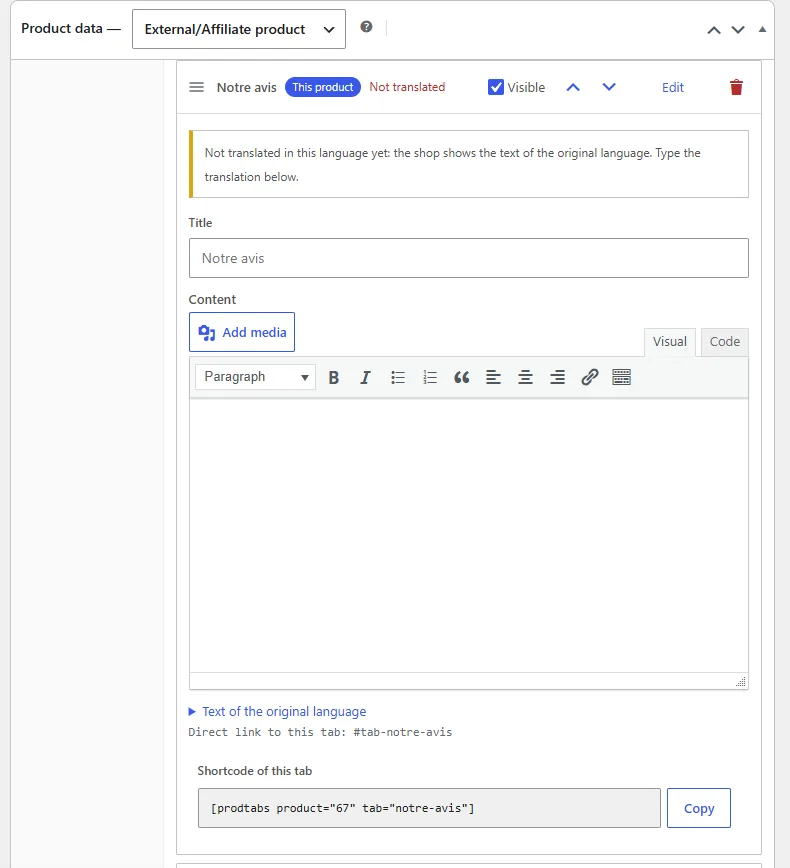
I chose to show the original text rather than nothing, because a customer reading the warranty in French on the Spanish version at least gets the information.
If you would rather hide those tabs until they are translated, that is the "Tabs not translated yet" setting in ProdTabs.
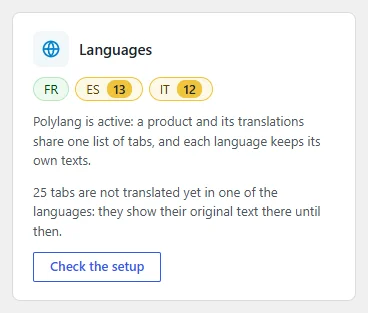
The ProdTabs overview counts what is left to translate, language by language:
TranslatePress and Weglot translate the page as displayed rather than the product data.
They translate ProdTabs tabs like the rest of the content, because all their text is in the page as soon as it loads (tested with TranslatePress 3.3 and Weglot 6.4).
If you are moving away from YIKES, the import is covered in my migration guide.
And if you are keeping your current plugin, open its folder and look for wpml-config.xml: it is the most cost-effective check I know.