
WooCommerce extension, free and Premium
Product tabs that speak every language of your shop
Size guides, shipping, returns, FAQs: ProdTabs puts the content that sells in product tabs that search engines can read, in every language of your shop. Built for WPML and Polylang from the first line.
- Version 0.4.1, October 16, 2026
- 800 KB zip
- WordPress 6.5+
- WooCommerce 8+
- PHP 7.4+
- How to install it
Envío en 48 horas a toda España.
Tabs that help you sell, and help you rank
The product page is where shoppers decide and where search engines and AI assistants judge your products. Tabs carry the answers they are all looking for.
Conversion
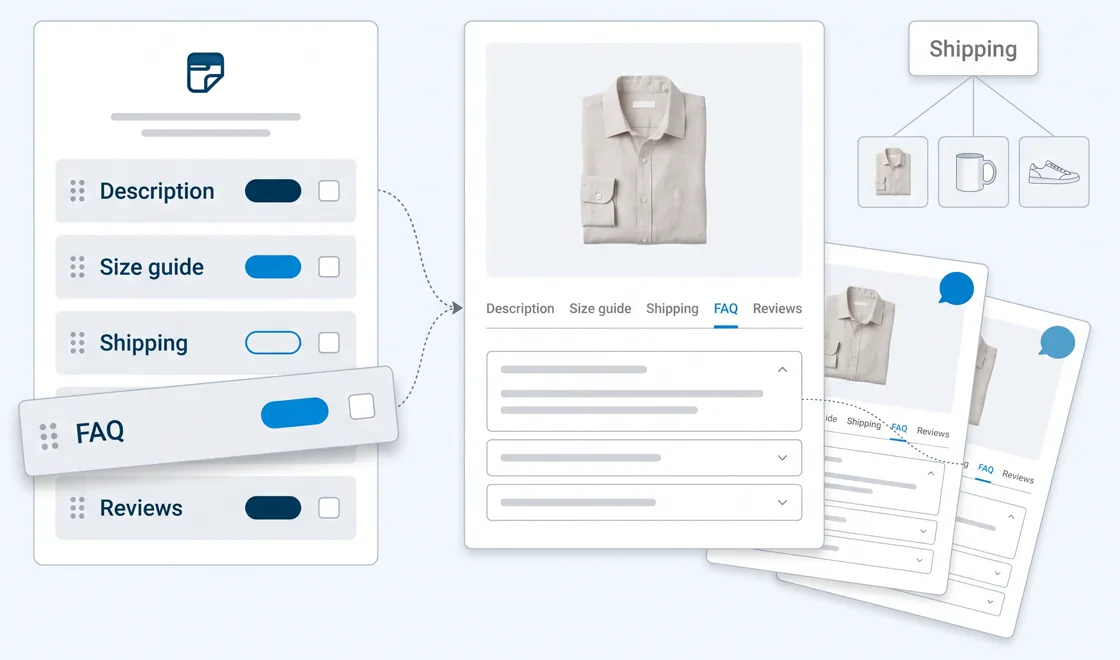
- Answers before the questionSize guide, shipping, returns and warranty sit on the product page, where the shopper decides.
- One shipping tab for the whole shopWrite it once, show it on every product, update it in one place.
- An accordion on phonesOn small screens the tabs turn into an accordion: shoppers scroll instead of hunting for tiny tabs.
- Links that open the right tabSend shoppers from an ad, an email or a support reply straight to
#tab-size-guide. - No empty tab in other languagesA text not translated yet shows in the original language, so no shopper loses the information.
- FAQ tabs that answer objectionsPREMIUMQuestions and answers in plain fields, shown as an accordion that works without JavaScript.
SEO and GEO
- In the HTML, not loaded laterEvery tab's text is in the page as soon as it loads, for search engines and AI crawlers alike.
- Translated content on every language pageWith WPML or Polylang, each translation of a product carries its own tab texts.
- Stable anchors for internal linksA link to
#tab-shippingkeeps working when you rename or translate the tab. - FAQPage structured dataPREMIUMOne schema.org block per page, in its language, for search engines and AI assistants.
- Your SEO plugin sees your tabsPREMIUMYoast SEO and Rank Math count the text of your tabs in their content analysis.
- Shop search finds tab contentPREMIUMA search for a material or a size finds the products whose tabs mention it.
Why ProdTabs
Product tabs hold the content that sells: size guides, shipping, care, warranty. ProdTabs keeps them easy to write, easy to reuse and easy to translate.
Multilingual for real
The list of tabs is the same in every language, and each language keeps its own texts. A text not translated yet shows in the original language instead of disappearing, and links to a tab stay the same everywhere.
Leave Custom Product Tabs in one click
ProdTabs imports the tabs of Custom Product Tabs (YIKES), with an analysis and a preview first. Your products keep the same tabs, order and links, and the import can be undone.
Made for WooCommerce today
Classic and block themes, including the Product Details block, High-Performance Order Storage, keyboard reordering, right-to-left languages, and an interface translated into 24 languages.
Everything you need for product tabs
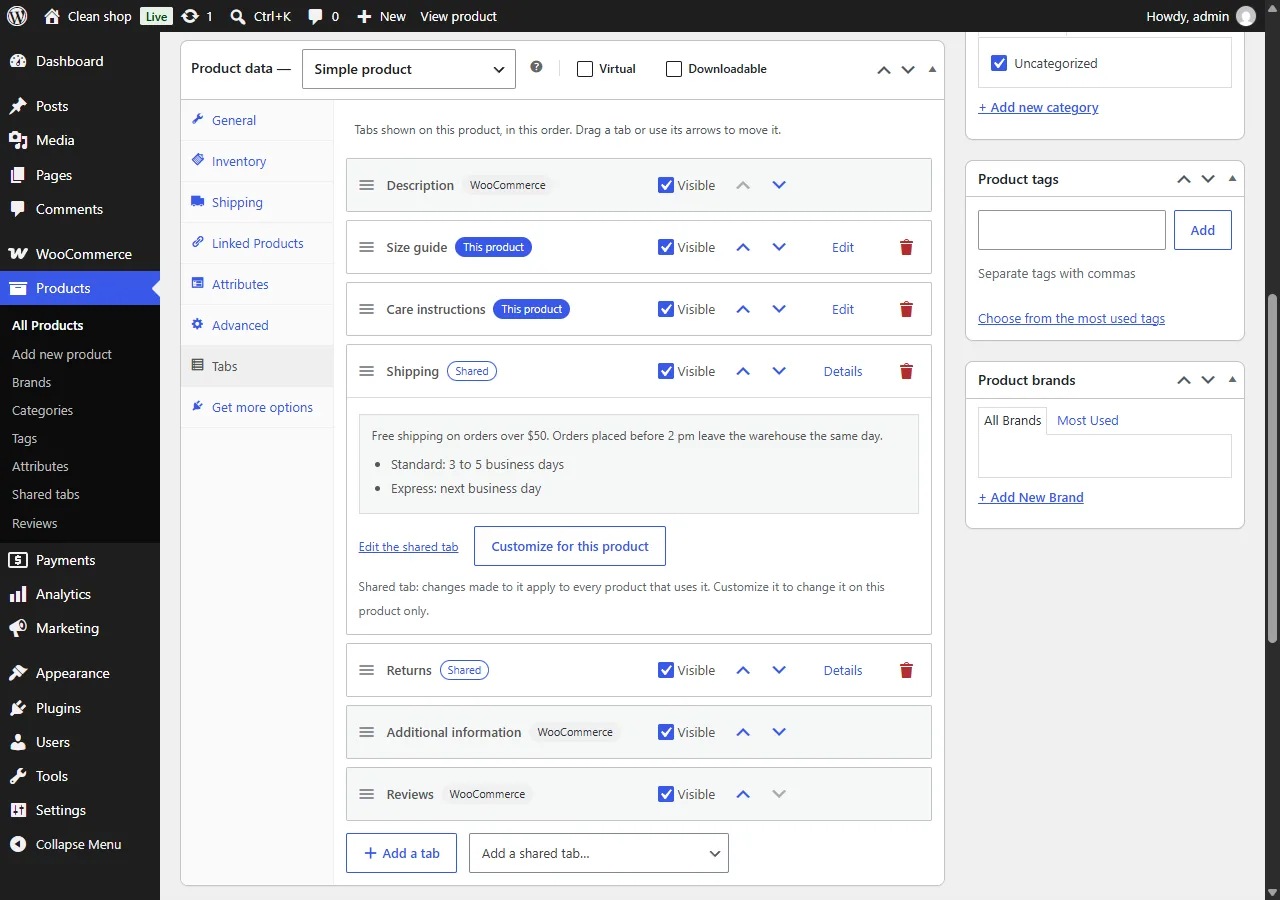
The free plugin is on its way to the WordPress.org directory.
- As many tabs per product as you need, written with the WordPress editor.
- All the tabs of a product in the order you want, WooCommerce tabs included, by drag and drop or with the arrows.
- Shared tabs: write shipping or returns once, add it to many products, or show it on all your products in one setting.
- Customize a shared tab on one product, and go back to the shared version whenever you want.
- Rename, hide or reorder Description, Additional information and Reviews for the whole shop.
- Direct links to a tab, such as
#tab-shipping. - Your tabs survive the CSV export and import of WooCommerce.
- No ads in your dashboard, no tracking.
Pricing
Every plan has all the Premium features, with updates and support for a year. The licence renews each year.
Single site
1 shop
$49 per year
$49 per shop
Agency
Up to 5 shops
$99 per year
$19.80 per shop
Studio
Up to 20 shops
$199 per year
$9.95 per shop
Prices before tax. VAT or sales tax is added at checkout where it applies. ProdTabs Premium needs ProdTabs, the free plugin.
Questions
Do I need the free plugin?
Yes. ProdTabs Premium is an add-on: it adds its features to ProdTabs, which does the tabs themselves. Download ProdTabs here.
How do I install ProdTabs?
Download the zip, then in WordPress: Plugins, Add New Plugin, Upload Plugin. Choose the file, click Install Now, then Activate. WooCommerce must be active. Once ProdTabs is published on wordpress.org, its updates come on their own, like for any plugin.
Does it work with WPML and Polylang?
ProdTabs ships a wpml-config.xml file, read by WPML and by Polylang, and is tested with Polylang. The list of tabs is shared by all languages and each language keeps its own texts. TranslatePress and Weglot translate the tabs on the page, like the rest of your content. In detail: translate WooCommerce product tabs with WPML or Polylang.
I use Custom Product Tabs (YIKES). Can I move?
Yes, from the free plugin: it imports the tabs of each product and the saved tabs, which become shared tabs. YIKES can stay active during the move, its data is never changed, and the import can be undone. Step by step: migrate from Custom Product Tabs without losing your tabs.
What happens if I turn Premium off?
Your tabs stay. FAQ tabs keep showing as accordions, without the structured data. Shared tabs targeted by category, tag or brand stop showing until Premium is back.
Which languages is the interface in?
English and 24 other languages, among them French, German (informal and formal), Spanish, Italian, Dutch, Portuguese, Polish, Swedish, Japanese, Korean and Chinese.