 Prod
ProdShowing WooCommerce product tabs anywhere with the [prodtabs] shortcode
Since version 0.4.0, released on October 15, 2026, ProdTabs (the product tabs plugin I build) can show the tabs of a product somewhere other than its product page.
I added it for two cases: themes and page builders that do not show the WooCommerce tabs at all, and pages that need one tab on its own, like a warranty or a size guide. Here is how it works.
Four forms of one shortcode
The shortcode is [prodtabs], and it comes in four forms:
[prodtabs]
[prodtabs product="14"]
[prodtabs product="14" tab="notre-avis"]
[prodtabs shared="1279"]
With no attribute, it shows every tab of the product of the page, as the shop shows them, which is the form to use in a product page template. With product, it shows the tabs of another product, on any page.
With tab, it shows a single tab, picked by its anchor: notre-avis is the tab that #tab-notre-avis opens (my demo shop is in French). The tab keeps its title unless you add title="no".
And shared shows a shared tab, written once for the whole catalog (a warranty, shipping terms, a size guide), in the language of the page.
The ready-made shortcode
Nobody wants to look up a product ID or a tab anchor, so the Tabs panel of each product gives the shortcode of each tab and of the whole product, with a button to copy it:
![The Tabs panel of a WooCommerce product: under the expanded Notre avis tab, the direct link #tab-notre-avis and the field Shortcode of this tab, [prodtabs product="14" tab="notre-avis"], with a Copy button; below, the other tabs, then the field Shortcode of all the tabs of this product, [prodtabs product="14"], with its Copy button.](/prodtabs/img/guides/codes-courts-panneau-en.webp)
The screen of each shared tab has the same field, with the shared form. The ProdTabs overview also lists the four forms, in its "Tabs anywhere" card.
Then you paste the code into the page, for example in a Shortcode block of the WordPress editor, or in the matching module of a page builder.
The Product tabs block
In the block editor, the "Product tabs (ProdTabs)" block does the same thing with nothing to copy. Its settings are three fields:
![The WordPress block editor on a page called Garantie et avis: a Shortcode block holding [prodtabs shared="1279"], then the selected Product tabs (ProdTabs) block showing the Notre avis tab. In the right sidebar, its settings: Product ID 14, One tab only notre-avis, and the Show the title of the tab toggle turned off.](/prodtabs/img/guides/codes-courts-bloc-en.webp)
The product ID can stay empty: the block then uses the product of the page, or of the Single Product block or product list around it. That is what lets you place it once in the product template of a block theme.
What visitors see
The example page as a visitor sees it on my French demo shop:
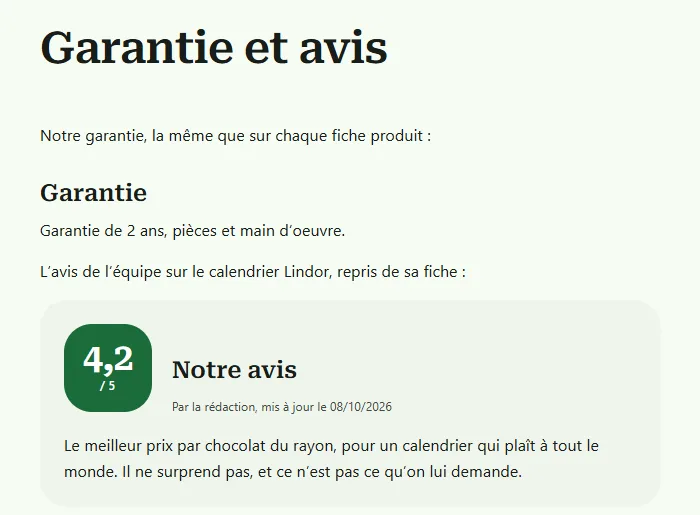
The shared tab keeps its title. The review tab gets none, because the block has its title toggle off (the same as title="no") and that tab's content already starts with its own heading.
Traps worth knowing
- The anchor can be typed any way:
notre-avis,tab-notre-avisor#tab-notre-avis. You can even type the title as it reads, and it is turned into the anchor. - A variation has no tabs of its own, so the ID of a variation shows nothing: use the ID of the parent product.
- A product that is not published, or is password protected, shows nothing to visitors.
- A tab that contains the shortcode itself shows nothing at that spot, otherwise the page would loop forever.
- On a multilingual shop, a shared tab not translated yet shows in the original language, unless the "Tabs not translated yet" setting hides it. More on that in my guide on translating tabs.
One last detail: the form that shows every tab loads the WooCommerce script that opens and closes tabs, so they work on pages that are not product pages too. The shortcode and the block are part of the free version of ProdTabs, which you can download here.